Edit or cancel a request
What you can do with a request depends on its status. Pending requests can be withdrawn, approved future requests can be cancelled, and drafts can be edited freely. In every case the reserved days go straight back to your balance.
All of these actions live in the right sidebar of your employee dashboard and in the History tab.
Withdraw a pending request
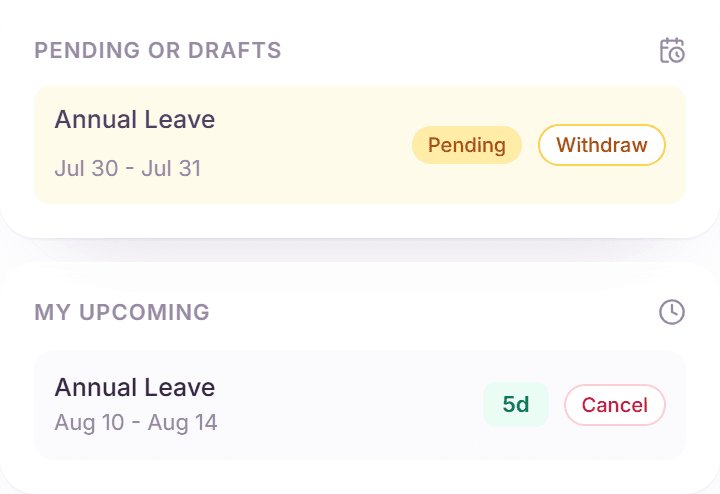
- In the right sidebar, find the request under "Pending or Drafts" (or open the History tab).
- Click "Withdraw" on the request.
- Confirm: the request is removed from your approver's queue and the reserved days return to your balance immediately.
You can withdraw at any point before the decision. Your approver simply no longer sees the request.
Cancel an approved request
- Find the approved, upcoming request in the sidebar under "Upcoming Time Off" (or in History).
- Click "Cancel" and confirm.
- The days are refunded to your balance and your manager is notified of the cancellation.
Only future requests can be cancelled. Time off that has already started or passed stays in your history as taken.
Change the dates of a request
There is no in-place date editor for a submitted request. The reliable pattern is: withdraw (or cancel) the existing request, then submit a new one with the correct dates. Because refunds are immediate, your balance is right for the new request straight away.
Edit a draft
- Drafts appear under "Pending or Drafts" in the sidebar and in your History tab.
- Click "Continue editing" to reopen the request dialog with everything you entered.
- Adjust dates, duration, or details, then "Submit Draft", or leave it saved for later.
Frequently asked questions
- Was my request denied, and can I fix and resubmit it?
- Yes. A denied request shows your approver's reason in the History tab. Nothing blocks you from submitting a new request with adjusted dates that addresses the reason.
- Do I get my days back immediately after cancelling?
- Yes. The refund is instant, and the Remaining card in your dashboard header updates in the same moment.
- Can my manager cancel my approved time off?
- Admins and managers can revoke an approved request when plans change on the company side. You are notified and the days return to your balance, exactly as with your own cancellation.