Leave types and policies
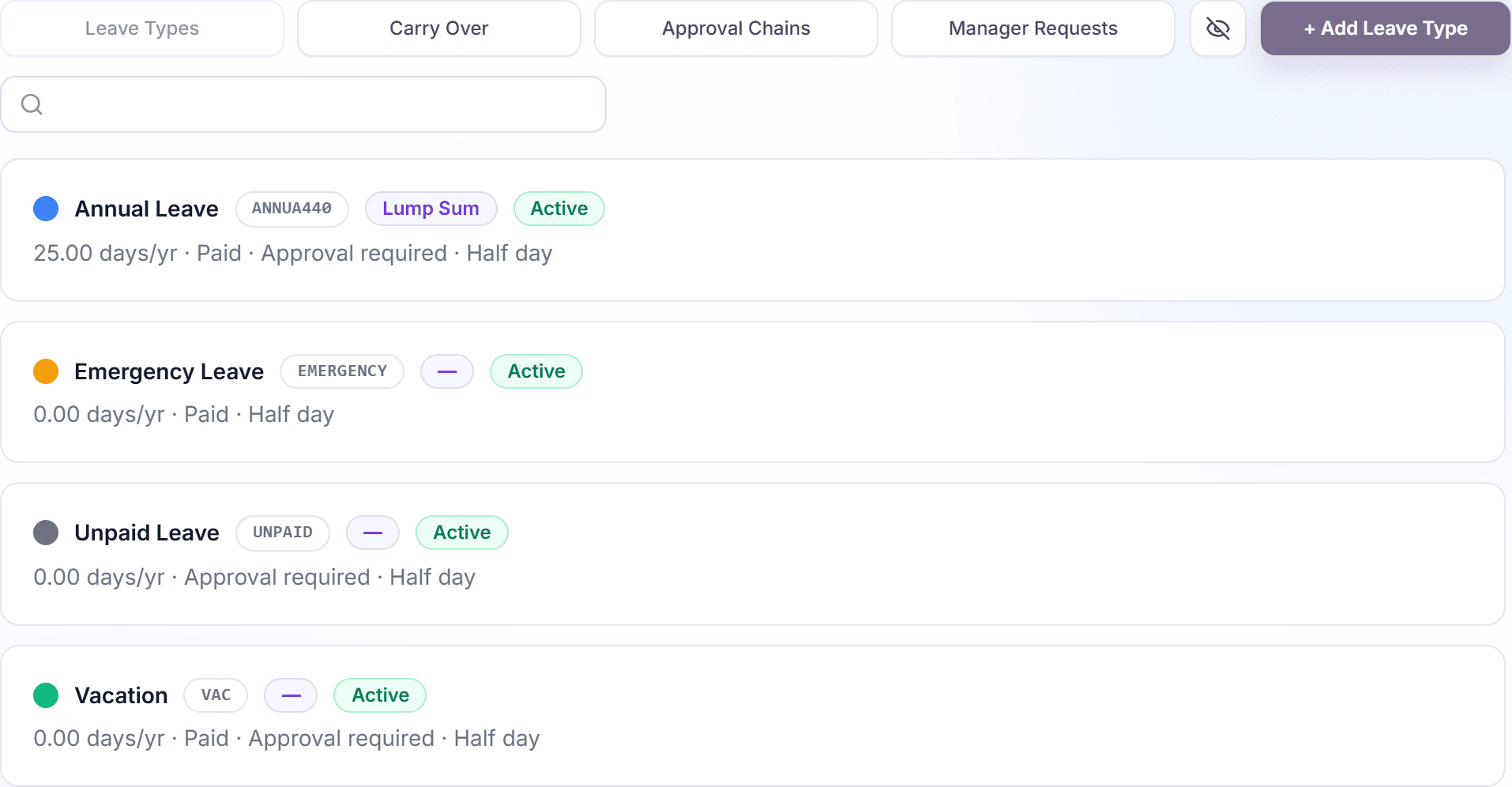
All leave types live in one list under Settings, Policy, Leave Types. Each card shows the essentials at a glance (name, code, grant model, allotment, and status), and every management action (edit, clone, archive, restore) happens right on the card.
Creating and editing a leave type opens the two-step wizard covered in Set up your first leave policy; this article covers managing the list itself.
Read the list
Every leave type is a card with a color dot, the name, and a row of badges:
- The short code (for example AL), used in compact views.
- The grant model: "Lump Sum", "Accrual", or "Hybrid". Accrual types also show their frequency ("Daily", "Weekly", "Bi-Weekly", "Monthly").
- The allotment line: "Unlimited" or "N days/yr", with suffixes like "· Paid", "· Approval required", or "· Half day" where those options are on.
- The status: "Active" or "Inactive".
Sick Leave is a built-in system type: it never appears in this list and needs no configuration.
Create, edit, and clone
- "+ Add Leave Type" opens the wizard for a new type.
- "Edit" (hover action on a card) reopens the wizard with the current configuration.
- "Clone" prefills a new wizard with a copy of the card's settings. The name gets " (copy)" so you can adjust it before saving. Handy for variants like a senior-staff version of an existing policy.
Editing a policy that people already use
When you change the yearly allotment of a leave type that is already assigned, the wizard does not apply it silently. A "Confirm policy impact change" dialog spells out the change (for example from 20 to 25 days) and tells you that balances will be recalculated from approved requests for the active cycle. Nothing changes until you click "Confirm change".
Archive, restore, and delete
- To retire a leave type, use "Archive". The "Archive Leave Type?" dialog confirms it. Archived types move to the inactive lane and stop being requestable; history stays intact.
- Switch lanes with the "View inactive" / "View active" toggle to see archived types.
- An archived type offers "Restore" (back to active) and "Delete permanently".
- Permanent deletion asks "Delete Permanently?" and is blocked while the type still has pending or upcoming requests or active assignments, so you can never orphan live data.
There is no delete on an active leave type by design: archive first, delete later if you are sure.
Frequently asked questions
- What happens to balances when I archive a leave type?
- Nothing retroactive: taken time off stays in everyone's history. The type simply stops appearing in the request dialog, and its assignments become inactive.
- Can I convert a lump-sum policy to accrual later?
- Yes. Edit the leave type and change the grant model in the Earning step. Because that affects how balances build up, the impact confirmation shows you what will be recalculated.
- Why is there no fiscal-year reset option?
- The wizard offers "Calendar" and "Anniversary" reset cycles. Fiscal-year reset is not offered for new policies; existing fiscal policies keep working.