Opening balances
When you switch to Time-Out Zone mid-year, people arrive with history: days already used, days carried over from last year. The opening balance import brings that legacy truth over in one CSV, so day one in the new system shows the same numbers as the last day in the old one.
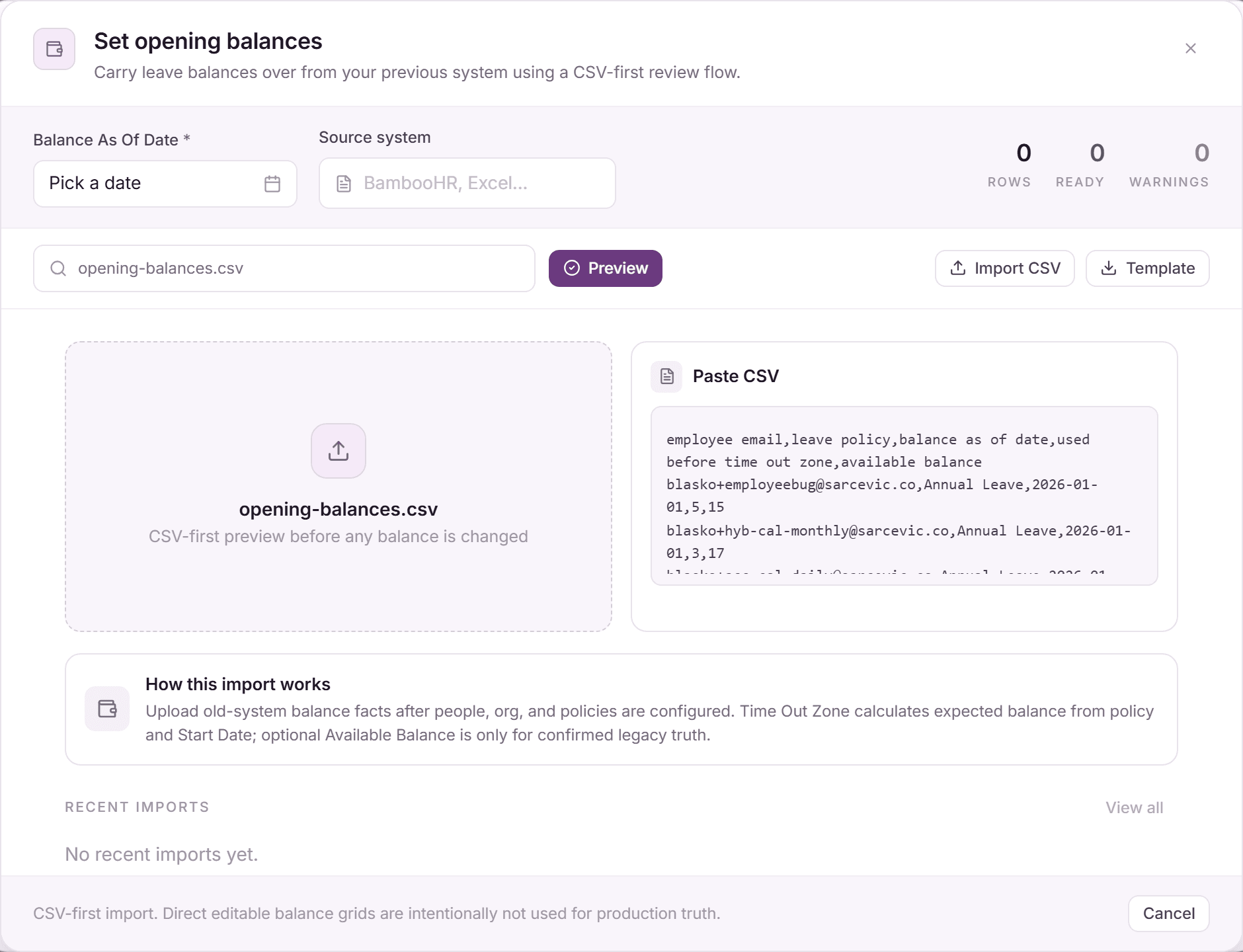
The import lives in the People view: the "Opening balances" button opens the "Set opening balances" dialog.
Prepare the CSV
Download the template from the dialog. Its columns:
- "Employee Email": must match an existing person.
- "Leave Policy": the leave type the row applies to.
- "Used Before Time Out Zone": days already taken this cycle in the old system.
- "Carried Over Balance (optional)" and "Carry-Over Expiry (optional)": last year's remainder and its expiry date.
- "Available Balance (optional)": only when the old system's remaining balance should stand as-is, even if it disagrees with the engine's math.
- "Source System (optional)" and "Notes (optional)": provenance for the audit trail.
The cutover date ("balance as of") is chosen in the dialog, not per row: one date for the whole import.
Run the import
- Open Settings, People, and click "Opening balances".
- Set the cutover date and source system, then drop your file on "Select opening balance CSV".
- Review the preview: rows are grouped into ready, warnings, and blocked, with per-row explanations.
- Warning rows (typically an "Available Balance" that contradicts the calculation) require the checkbox "Accept warning rows as legacy truth where allowed" before applying.
- Apply: balances are written and every row lands in the "Opening balance import history".
How opening balances combine with policies
The import does not replace policy assignment: it feeds the same balance formula everyone sees. "Used Before Time Out Zone" fills the Used side, "Carried Over Balance" fills the Carried Over card with its expiry, and from the cutover date on, the assigned policy takes over accrual and resets as normal.
Opening import vs. everyday adjustments
This surface is for cutover only: confirmed legacy truth from your previous system, imported once with full provenance. Ongoing corrections (a miscounted day, a goodwill grant) are handled per person on their profile, not by re-running the import.
Frequently asked questions
- What blocks a row?
- Hard mismatches: an e-mail that matches nobody, a leave policy that does not exist, or unparseable numbers or dates. Blocked rows never apply. Fix the CSV and re-upload; valid rows are unaffected.
- Can I run the import more than once?
- Yes, for example one file per department. The "Opening balance import history" keeps every run with its file, date, and outcome per row.
- Why is there no balance column in the people bulk-invite CSV?
- Deliberately separate concerns: invitations create people; opening balances state legacy truth with warnings, provenance, and history. Mixing them would hide balance mistakes inside an invite flow.