Tags and segmentation
Tags target rules at groups of people who do not sit neatly in one team or department: senior staff, union members, people with a special duty. They live under Settings, Advanced Settings, and come in three kinds that do three different jobs.
In the priority order, tags sit directly below person-level overrides and above teams: a tag beats every organizational assignment except a direct one.
The three kinds of tags
- Replacement tags (the "Policy Override" section) swap the person's base policy entirely. A person can carry at most one replacement tag; use "Assign Policy" on the tag card to choose which policy it grants.
- Additive tags stack extra days on top of the base policy, grouped into categories: "Seniority", "Duty Bonus", "Union", and "Custom". A person can carry up to four additive tags, at most one per category.
- Personal entitlements: event-based leave (birthday, bereavement, parental, relocation, religious) granted per person, independent of the base policy; each card offers "Send Reminder" for eligible people.
Replacement changes which policy applies; additive changes how much; personal entitlements add separate occasions. They can be combined on one person within the limits above.
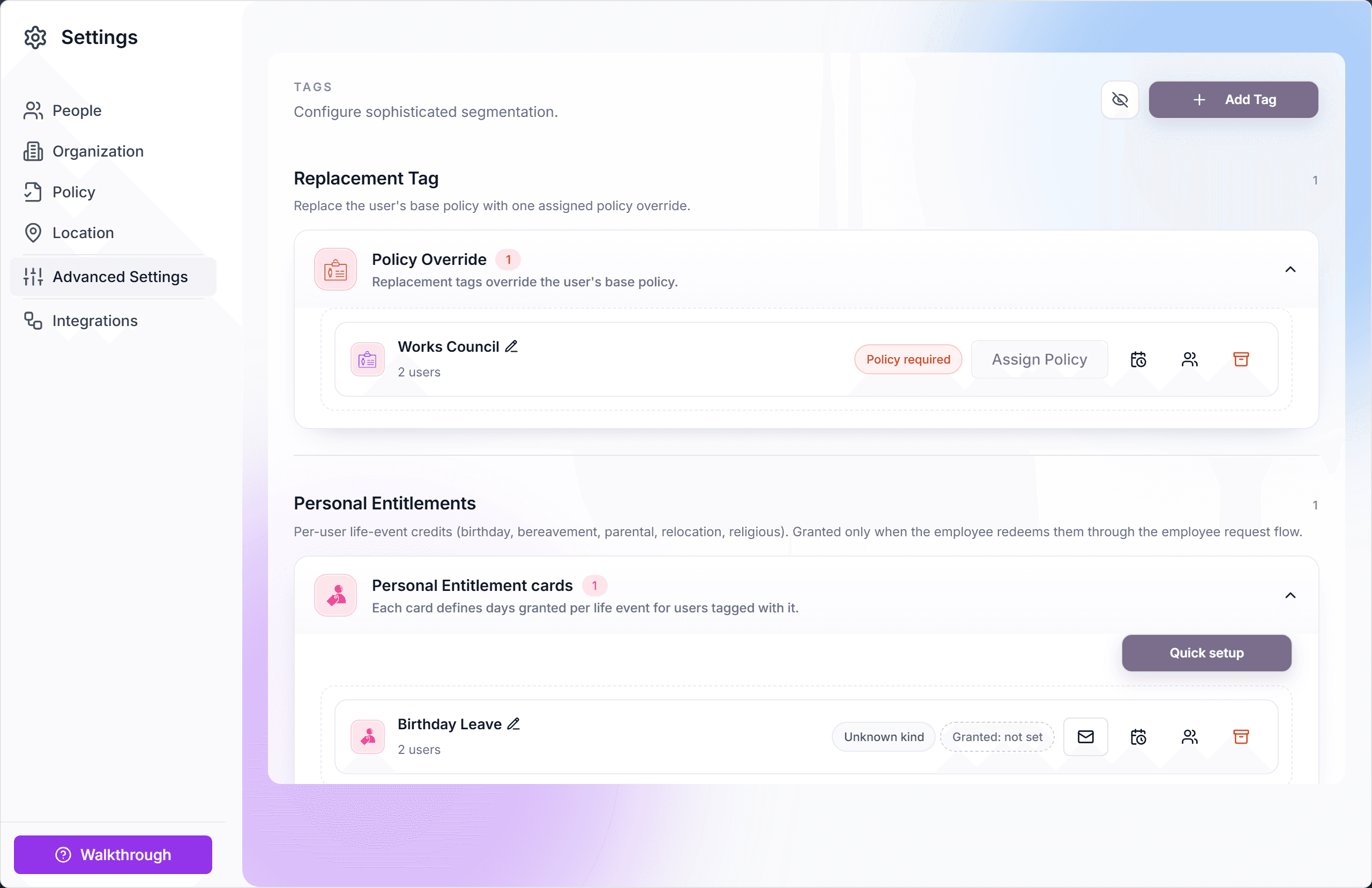
Create a tag
- Open Settings, Advanced Settings.
- Create the tag in the matching section. The create dialog marks the mode ("Override" for replacement, "Additive Tag" for additive, or an entitlement kind).
- For a replacement tag: assign its policy with "Assign Policy" on the card.
- For an additive tag: set the bonus days, editable later directly on the card.
- Assign the tag to people from their profiles in the People view.
How employees see tags
Tags are transparent to the people carrying them. The dashboard's "Additional PTO" balance card sums additive bonus days, and the My Policy tab lists "Additional PTO from active tags" plus any personal entitlements, with the tag as the named source.
Limits and safety rails
- One replacement tag per person: the UI blocks a second.
- Up to four additive tags per person, at most one per category ("Maximum of one additive tag can be assigned per category for an individual user.").
- A replacement tag's policy is locked while people carry the tag, so a policy swap is always a deliberate act.
- Changing an additive tag's day amount updates every carrier's balance.
Frequently asked questions
- What is a practical example of the three kinds together?
- A works-council member (replacement tag with a legally negotiated policy) who has been with the company ten years (additive Seniority tag, +5 days) and gets a birthday day off (personal entitlement). The replacement decides the base; the other two stack on top.
- Why can a person have only one replacement tag?
- Two replacement tags would both claim to be the base policy with no sensible winner. If you need combinations, model the difference as additive tags on one replacement policy.
- Does removing a tag recalculate balances?
- Yes, immediately. Removing a replacement tag lets resolution fall back to team, department, or location; removing an additive tag subtracts its bonus days from the allotment.