Audit trail
Every change in the company is written to the audit trail in the same step as the change itself: policies, requests, roles, teams, locations, tags, balance imports, company settings. The "Audit" tab on the admin dashboard is the company-wide compliance view: "who changed what, newest first".
There are three audit surfaces with different scopes: this company-wide log, a per-person "Audit Trail" tab on profiles, and the manager Audit tab for approval decisions.
Read the company-wide log
The "Audit Log" panel shows timeline cards: the actor, an action summary, the timestamp, and (expandable) the exact field changes as before-and-after diffs ("N field(s) changed"). Request events deep-link with "View request".
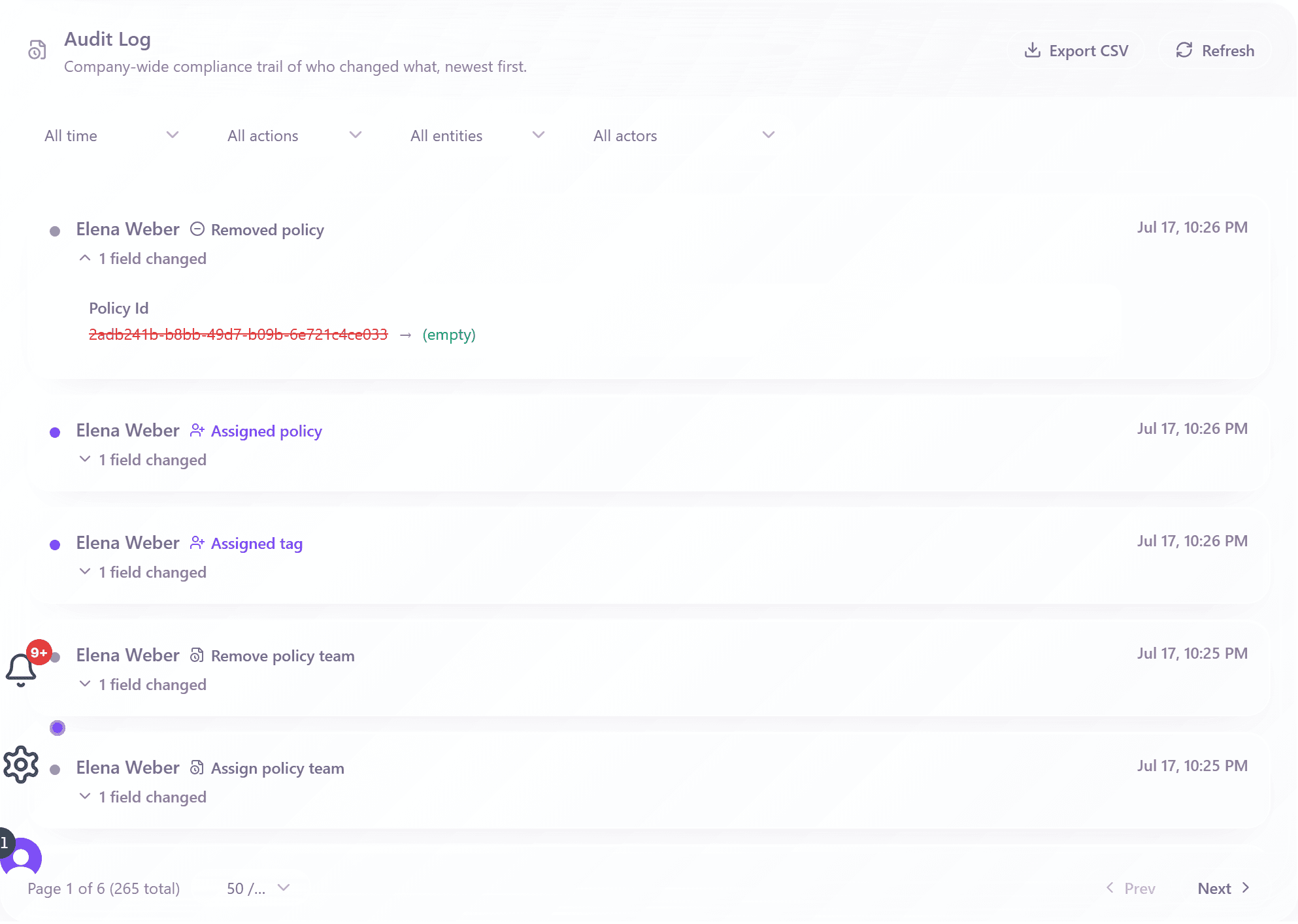
Filter and export
- Date: "All time", "This month", "Last month", or "Custom range".
- Action: "Created", "Updated", "Deleted", "Assigned", "Removed", or "All actions".
- Entity: from "User" and "Policy" through "Team", "Location", "Holiday calendar", "Tag", "Role", and "Balance import" to "Company settings".
- Actor: any named person or "All actors"; "Clear" resets everything.
- Pagination up to "500 / page" for long investigations.
- "Export CSV" downloads the filtered view with columns Date, Actor, Action, Entity, Entity ID, and Changes.
Export is CSV; there is no PDF export of the audit log.
The per-person audit trail
Every profile in the People view has an "Audit Trail" tab (admin-only) listing that person's history ("Date Changed", "Event", "History") with its own date and event filters and "Export CSV". The fastest answer to "who changed this person's policy and when?".
Three audit surfaces, one rule
- Admin "Audit" tab: company-wide, all entity types, admin permission.
- Profile "Audit Trail" tab: one person's history, admin-only.
- Manager Audit tab: the manager's own approval decisions, with CSV and Excel export.
- The rule everywhere: entries are written atomically with the change and are never edited or deleted afterwards.
Frequently asked questions
- Are approval decisions in the company-wide log too?
- Yes. Request events including approvals, denials, and coverage overrides are entity type "Request". The manager Audit tab is a convenience view of the same truth, scoped to that manager.
- How long are audit entries kept?
- For the life of your account: there is no automatic purge. If you close your account, company data including the audit log is retained 30 days and then deleted.
- Can an admin edit or remove an audit entry?
- No. The log is append-only by design; not even owners can rewrite history. That is what makes it usable as evidence.