What is Time-Out Zone?
Time-Out Zone is a leave management platform for companies: employees request time off, managers approve it, and admins define the rules in one place: leave types, entitlements, accrual, carry-over, holidays, and approval chains.
This article explains the three role dashboards and the core concepts you will meet everywhere in the product.
The three dashboards
Everyone signs in through the same account; the product routes each person to the dashboard that matches their role.
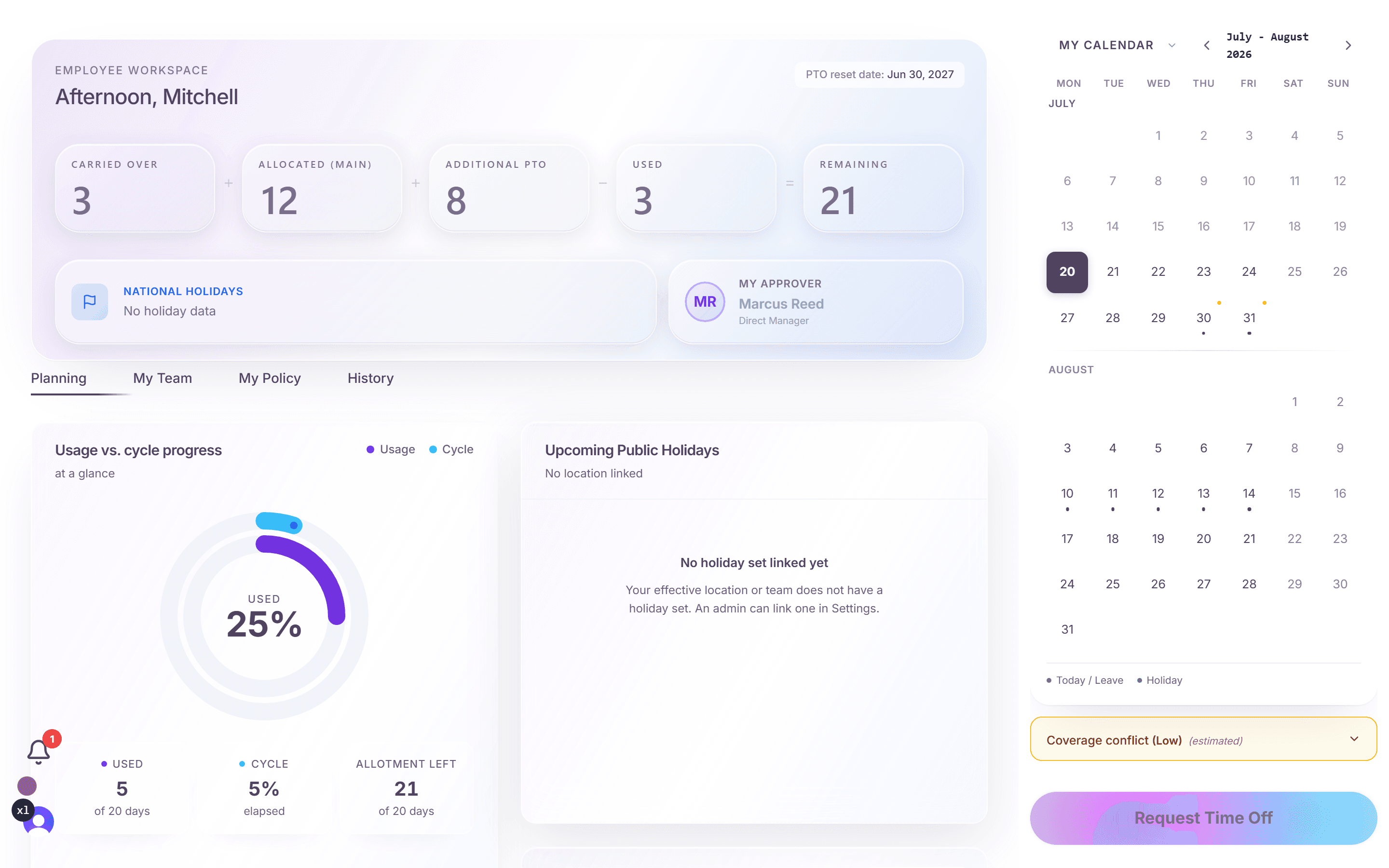
- Employees work in the employee dashboard: request time off, record sick days, check balances, and see their own policy and team availability.
- Managers work in the manager dashboard: approve or deny requests, watch team coverage, manage deputy cover, and review their approval audit log.
- Admins and owners work in the admin dashboard: company-wide analytics, the audit trail, and the settings modal where all rules are configured.
Leave types and policies
A leave type (for example Annual Leave or Personal Day) carries a policy: how many days per cycle, how they are earned (all at once, accrued over time, or a hybrid), when the allowance resets (calendar year or each person's hire anniversary), and what happens to unused days at year end.
Sick leave is a built-in system type: it is unlimited, tracked separately from the paid-time-off balance, and recorded through its own dialog.
How the right rules find each person
You rarely assign a policy to every person one by one. Policies attach to locations, departments, teams, tags, or individual people, and the system resolves the effective policy per person by a fixed priority order:
- Person (a direct assignment always wins)
- Tag (group labels, for example seniority or union membership)
- Team
- Department
- Location (the lowest level, the compliance fallback)
Every employee can see which rules apply to them and where they come from in the My Policy tab of their dashboard.
Requests and approvals
Employees submit requests from their dashboard; the system validates them against the policy before anything reaches a manager: advance notice, blackout periods, available balance, waiting periods for new hires, and team coverage rules.
Approvals can be a single manager decision or a multi-step chain, with deputy approvers covering while a manager is away. Every decision is written to an audit trail.
Where to go next
- Create your company: set up a new account from scratch.
- Invite your team: single invitations and bulk CSV import.
- Set up your first leave policy: the leave-type wizard, step by step.
Frequently asked questions
- Is Time-Out Zone multi-tenant? Can another company see our data?
- No. Every company's data is fully isolated: every query is filtered by company in the application code, and automated tests actively try to leak data across companies to prove they cannot.
- Which languages does the product support?
- The public website is available in English and German. The application interface is English-first; localized surfaces are being expanded.
- Do employees need training to use it?
- No. Each role gets a guided tour on first visit, and the everyday actions, requesting time off, checking a balance, approving a request, are one or two clicks from the dashboard.