Bulk import
Bulk import turns a spreadsheet into invitations: every valid row becomes a pending person with a profile and an invitation e-mail, placed in the right location, department, and team from the start. This article covers the CSV format and validation in admin depth. The general invitation flow is in Invite your team.
The importer opens from the People toolbar ("Import users") or via "Bulk import" inside the single-invite dialog, and walks three steps: source, preview, done.
The CSV columns
"Download template" gives you the exact header row (file: people-import-template.csv). Required columns:
- "Email", "First Name", "Last Name": the identity of the person.
- "Start Date": format YYYY-MM-DD; drives waiting periods and tenure rules.
Optional columns: "Role (optional)", "Employee ID (optional)", "Job Title (optional)", "Employment Type (optional)", "Weekly Work Hours (optional)", "Location Name (optional)", "Department Name (optional)", "Team Name (optional)", "Approver Email (optional)".
Forgiving parsing
- Header aliases are accepted: "firstname", "hire date", or "manager email" map to the right columns automatically.
- E-mails are normalized case-insensitively; a duplicate within the file is flagged as "Duplicate email in file".
- No file at hand? "Paste rows" accepts copied spreadsheet rows directly; "Parse rows" turns them into the same preview.
- Organizational columns are matched by name against your existing locations, departments, and teams.
Preview, fix, send
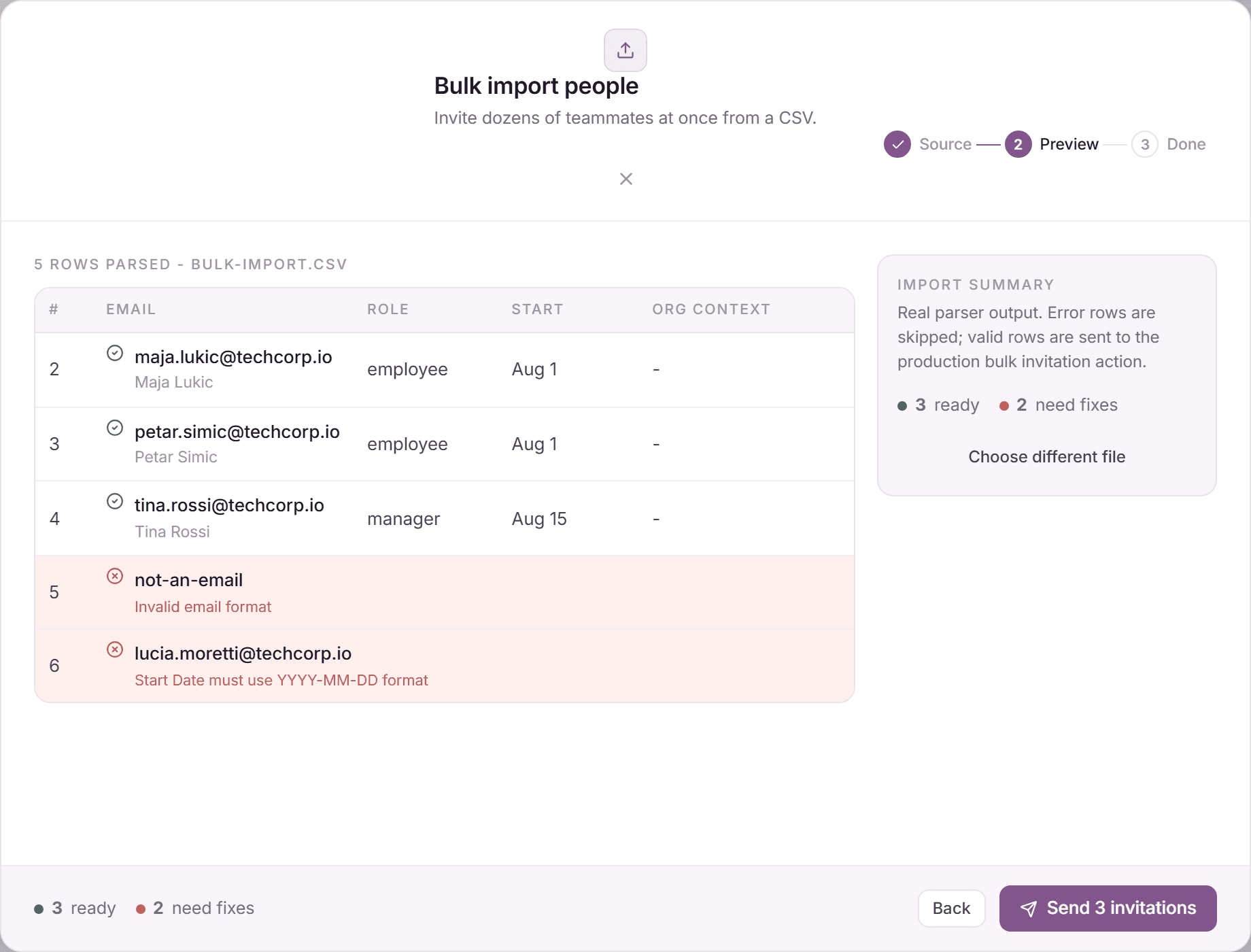
- After parsing, the preview splits rows into ready and "need fixes", each error row with its concrete problem.
- Only valid rows are ever sent. You can send the ready rows now and re-import the fixed stragglers later, or use "Choose different file" to start over.
- Click "Send N invitation(s)". Every row goes through the exact same pipeline as a single invitation.
- The done step confirms "N invitations sent"; manage the resulting pending invitations (resend, copy link, delete) as usual.
What bulk import deliberately does not do
- No balance columns: legacy balances go through the separate opening balance import with its warning and provenance flow.
- No tags column: tags are assigned on profiles after people join.
- No silent account creation: submitting always sends invitations; people join by accepting.
Frequently asked questions
- What if a location or team name in the CSV does not exist?
- The row is flagged in the preview. Create the missing entity first (or fix the spelling) and re-upload. Organizational columns only match existing entities, they never create them on the fly.
- Can I set managers via CSV?
- Yes. "Approver Email (optional)" links each person to their approver, as long as the approver already exists or is part of the same import.
- Is there a row limit?
- Batches of a few hundred rows are the practical sweet spot per import. Split larger migrations by department, which also keeps error fixing manageable.