Carry-over and reset cycles
Two settings decide what happens at the turn of a leave year: the reset cycle (when the year turns for each person) and the carry-over policy (what happens to unused days at that moment).
Reset cycles are set per leave type in the wizard's Earning step; carry-over policies are reusable templates managed under Settings, Policy, Carry Over.
Reset cycles: when the year turns
- "Calendar": everyone resets on January 1. Simple to administer, one shared rhythm.
- "Anniversary": each person resets on their own hire date. Fair for mid-year joiners; no proration debates.
Employees always see their own next reset as "PTO reset date:" at the top of their dashboard, whichever cycle applies.
Carry-over strategies
A carry-over policy is a named template with one of five strategies:
- "Full carry-over": everything unused rolls into the new cycle.
- "Partial carry-over": a cap rolls over, the rest lapses; the cap is "Fixed days" (e.g. maximum 5) or "Percentage".
- "Reset": unused days lapse entirely.
- "Payout": unused days are paid out instead of rolling over.
- "Payout & carry-over": a split slider decides what percentage is paid out and what percentage rolls over.
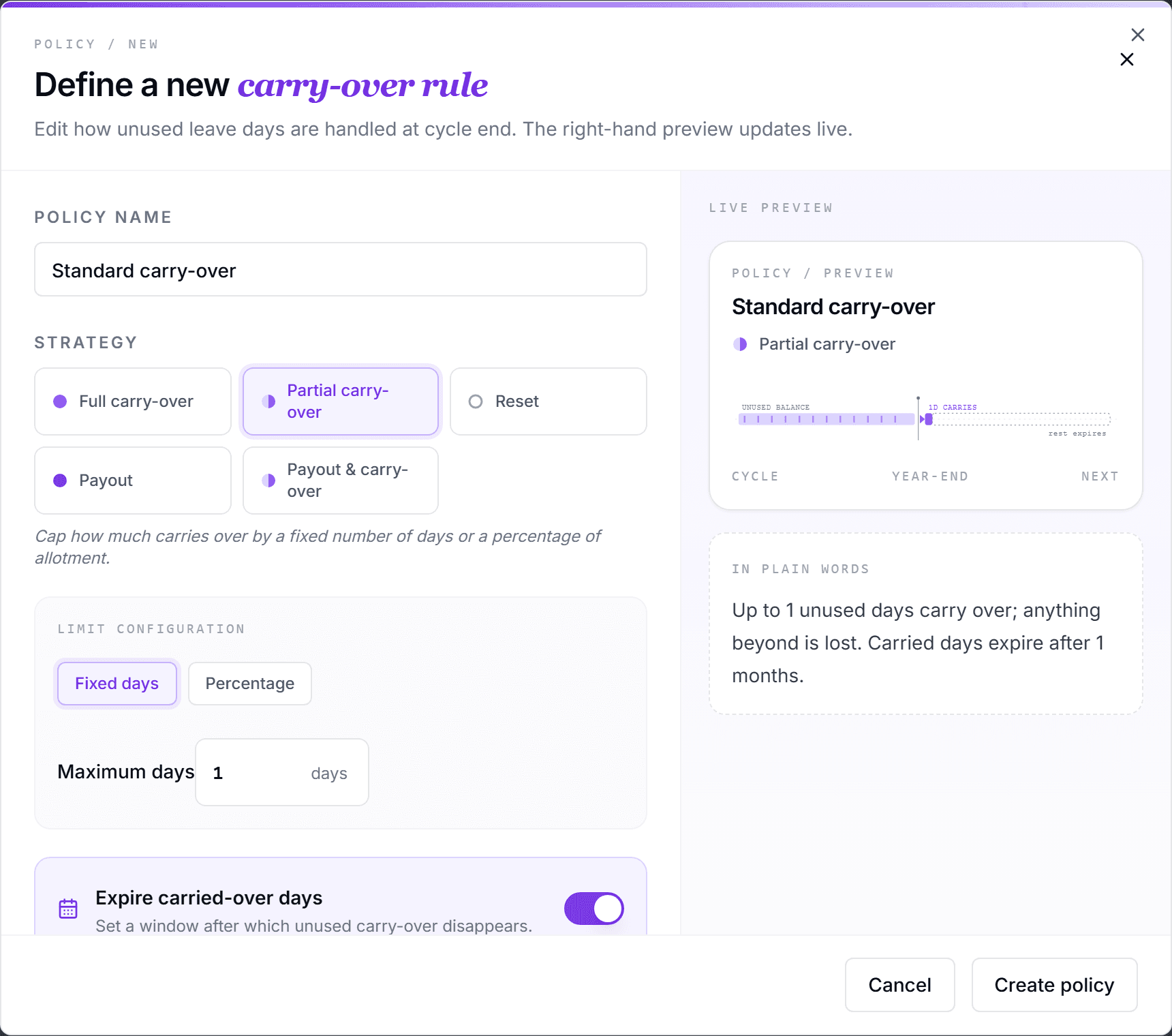
Expiry of carried-over days
For strategies that roll days over, the "Expire carried-over days" toggle adds a deadline in days or months after the reset (a common choice: three months, i.e. March 31 on a calendar cycle). Employees see the expiring days highlighted on their dashboard and get reminders before they lapse.
Create a template and attach it
- Open Settings, Policy, and switch to "Carry Over".
- Click "New policy", name it (e.g. "Standard 5-day rollover"), pick the strategy and limits, and click "Create policy".
- Attach it to a leave type: in the leave-type wizard's Earning step, click "Change" next to the carry-over line, pick the template, and confirm with "Assign Policy", or click "Use default".
- Each template card shows a "Used by" count, so you always know which leave types depend on it.
Every company starts with the default template "Default - Full Reset / No Carry-Over". It cannot be removed, so a leave type without an explicit choice always has a defined year-end behavior.
Frequently asked questions
- Can I edit a template that leave types already use?
- Yes. Edits apply to every leave type using the template. Deleting is blocked while a template is assigned; the "Used by" count shows what depends on it.
- What do employees see of all this?
- Their My Policy tab has a "PTO Reset & Carry-over" section: the current carried-over balance, the rule, the expiry date, and anything already forfeited: the same numbers you configure here.
- Which strategy should a small company start with?
- Partial carry-over with a fixed cap of around 5 days and a three-month expiry is the most common baseline: it rewards planning without letting liability pile up. Full reset is stricter but check your local law: some jurisdictions require carry-over.