Deputy approvers
A deputy covers your approvals while you are away: for a defined date window, a teammate you choose sees your pending queue and can approve or deny in your place. Requests never sit unanswered just because the manager is on vacation.
Deputy cover is arranged from the "DEPUTY" card in the right rail of your manager dashboard.
Request deputy cover
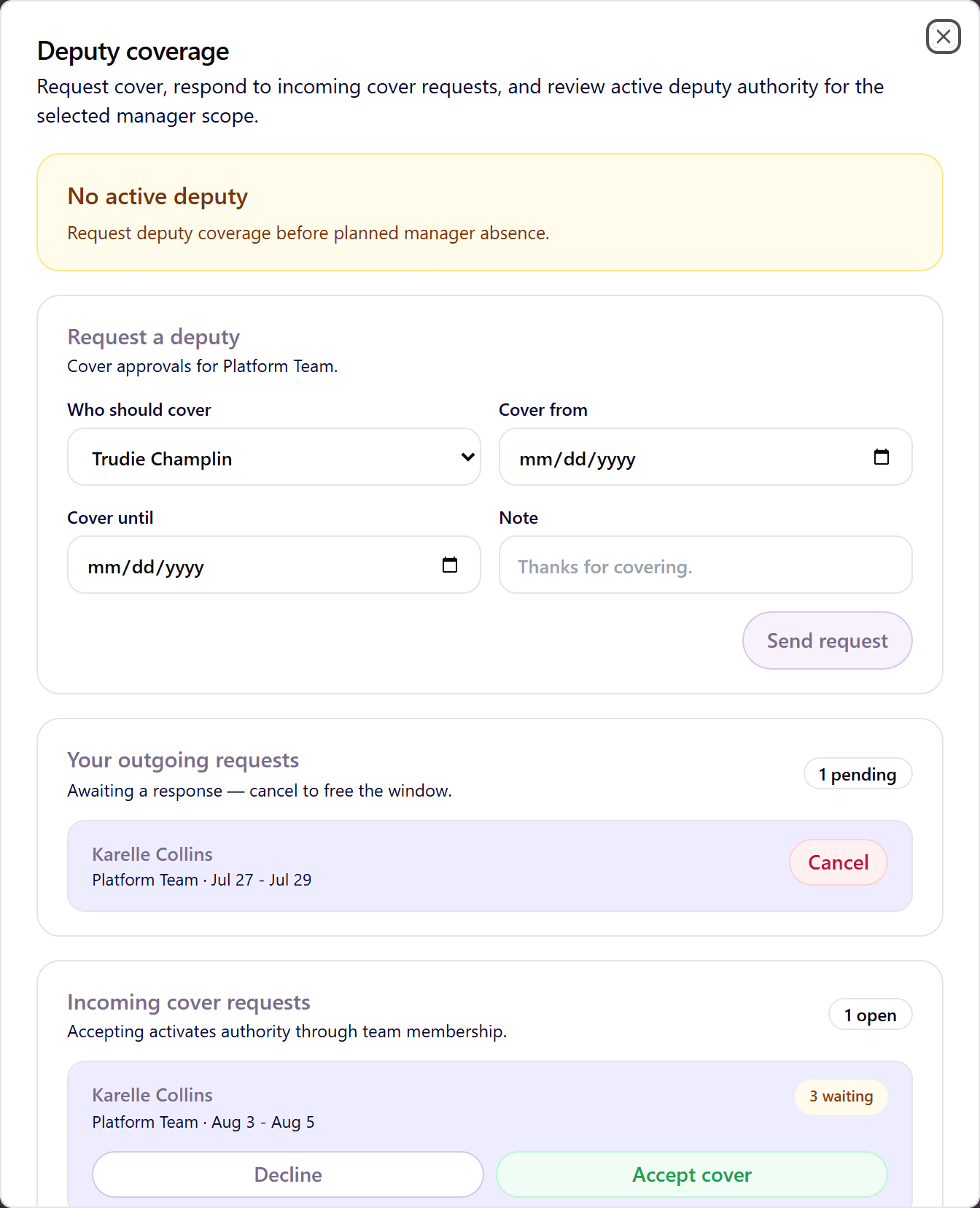
- On the manager dashboard, find the "DEPUTY" card in the right rail and click "Open deputy view". The "Deputy coverage" dialog opens.
- In "Request a deputy", pick "Who should cover" from your team members.
- Set the window with "Cover from" and "Cover until".
- Optionally add a note, then click "Send request".
Only the team lead can request deputy cover for a team. The chosen person must accept before the cover becomes active.
Accept or decline a cover request
The chosen teammate sees the request under "Incoming cover requests" in the same dialog, with "Accept cover" and "Decline" buttons. You can track and cancel your own requests under "Your outgoing requests".
What a deputy can do while active
- See your pending queue and approve or deny requests during the cover window. The "DEPUTY" card shows "Deputy active".
- Comments a deputy adds are visible to the team and to you as the original approver.
- Every deputy decision is written to the audit log attributed to the deputy, so accountability stays clear.
- When the window ends, access ends automatically. The card shows "Deputy expired" and your queue is yours again.
Deputies vs. multi-step chains
A deputy is a temporary stand-in for one approver; a multi-step chain is a permanent routing rule (for example team lead, then HR). They combine cleanly: if a chain step's approver has an active deputy, the deputy acts for exactly that step.
Frequently asked questions
- Can I have two deputies at once?
- One active deputy per team at a time. For longer absences you can line up consecutive cover windows with different people.
- Can the deputy change my team's settings?
- No. Deputy cover grants approval rights only. Team configuration, policies, and people management stay with you and your admins.
- What happens to requests submitted while nobody accepted the cover?
- They wait in your queue as usual. Employees can use Remind, and you can decide them when you are back, or the deputy decides them once the cover is accepted.